Payment monitoring for WooCommerce agencies
Find out before your client does.
A payment gateway breaks quietly. No error page, no alert — just orders that stop arriving. You usually hear about it hours later, from the client, and by then the money is gone. GatewayWatch watches every payment across every store you manage and tells you what broke, why, and exactly how to fix it.
No card required. Install the plugin, paste a key, done in five minutes.
Anyone can tell you payments failed.
The useful part is knowing why, and what to do about it. Here is an actual alert, unedited — not a mock-up.
Stripe is rejecting your API credentials
12 out of 12 recent transactions on Stripe failed with
authentication errors (100% failure rate). Sample error codes:
invalid_api_key. This means your API keys are no
longer accepted — typically because they were regenerated, the
account changed mode (live/test), or the credentials were revoked.
Every payment on this gateway is currently failing.
Recommended actions
- Go to Stripe Dashboard → Developers → API keys
- Make sure the "View test data" toggle matches your WooCommerce mode
- Copy the Secret key (
sk_live_…) into WooCommerce → Settings → Payments → Stripe - Perform a $1 test transaction to confirm
That is the whole product. Uptime monitors tell you a site responds. Gateway dashboards tell you a charge failed. Neither tells a busy agency which of thirty stores just stopped taking money, or which menu to open to fix it.
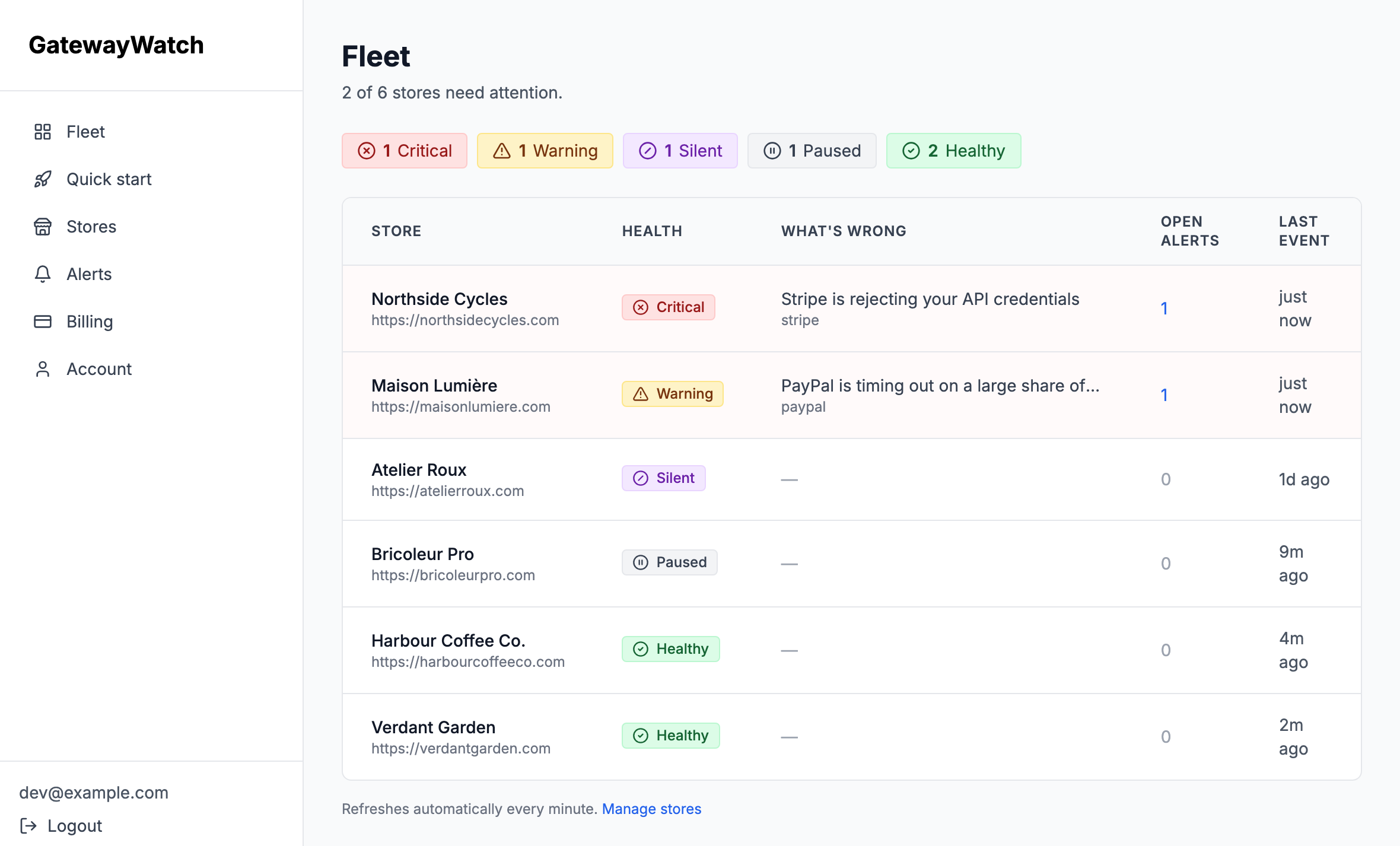
One screen for every client store.
Stores that need attention sort to the top, and each row says what is actually wrong. No clicking through thirty stores to find the broken one.
Five minutes per store.
No code, no server access, no change to how the store takes payments.
Install the plugin
A standard WooCommerce plugin on the client's site. It reads payment events and nothing else.
Paste the store key
One field in the settings screen. Monitoring starts on the next order.
Get told when it breaks
Email or Slack, with the diagnosis and the fix. And a second message when it recovers.
What it catches today.
Ten detectors, each with its own diagnosis. Listed honestly — this is what ships now, not a roadmap.
Expired or revoked API keys
The classic silent killer: keys rotated in the gateway dashboard and never updated in WooCommerce. Every payment fails.
Gateway outages
Stripe, Square and Mollie status pages, polled continuously. You learn it is the provider's fault, not yours.
Card-testing attacks
Bursts of small failed payments — a bot validating stolen cards through your client's checkout, running up fees.
Gateway timeouts
Customers see a spinner, then an error. Some of those cards are charged without an order ever being created.
Currency and region mismatches
The account does not support the currency being charged. Every customer in that market fails, indefinitely.
3-D Secure failures
Valid cards failing the bank's authentication step — usually a misconfigured 3DS setup or a blocked redirect.
Volume collapse
Orders stop with no errors at all. Often a theme or plugin update that quietly broke the checkout page.
Breakage after an update
Payments fell off right after WordPress, WooCommerce or a gateway plugin was updated. Answers the first question you would ask — what changed? — before you go looking.
Paid orders never confirmed
The gateway took the money, but its confirmation never reached the site. The customer thinks they ordered; the shop sees a pending order and assumes an abandoned cart.
Checkout failing before the order
The worst kind, because nothing reaches the order list to look wrong: shoppers are blocked at checkout and no order is ever created. Your admin screen looks like a quiet day.
Your clients' customer data never leaves their server.
You are a processor for your clients, and every store you connect is their data, not yours. So the plugin transmits transaction metadata and nothing else — and strips personal data out of gateway error text before it is ever queued for sending.
What it sends
- gateway
- status
- error code
- amount + currency
- order id
- timestamp
What it never sends
- customer name
- email address
- billing address
- card numbers
- phone number
- cart contents
Priced per agency, not per store.
One outage caught pays for a year. Cancel whenever.
Every plan includes all ten detectors, email and Slack alerts, and recovery notifications. The trial needs no card.
Stop hearing it from the client.
Connect one store, break a test payment, and see what arrives.